Architecting and Deploying Web Applications with Claude Code
The software industry is pivoting from manual coding to an agent-driven lifecycle. Move beyond chatbots to AI Agents, which are autonomous reasoning engines that execute complex workflows. Learn how Claude Code and the RANF framework transition developers from coders to high-level orchestrators.
1. Strategic Overview of the AI-Native Development Lifecycle
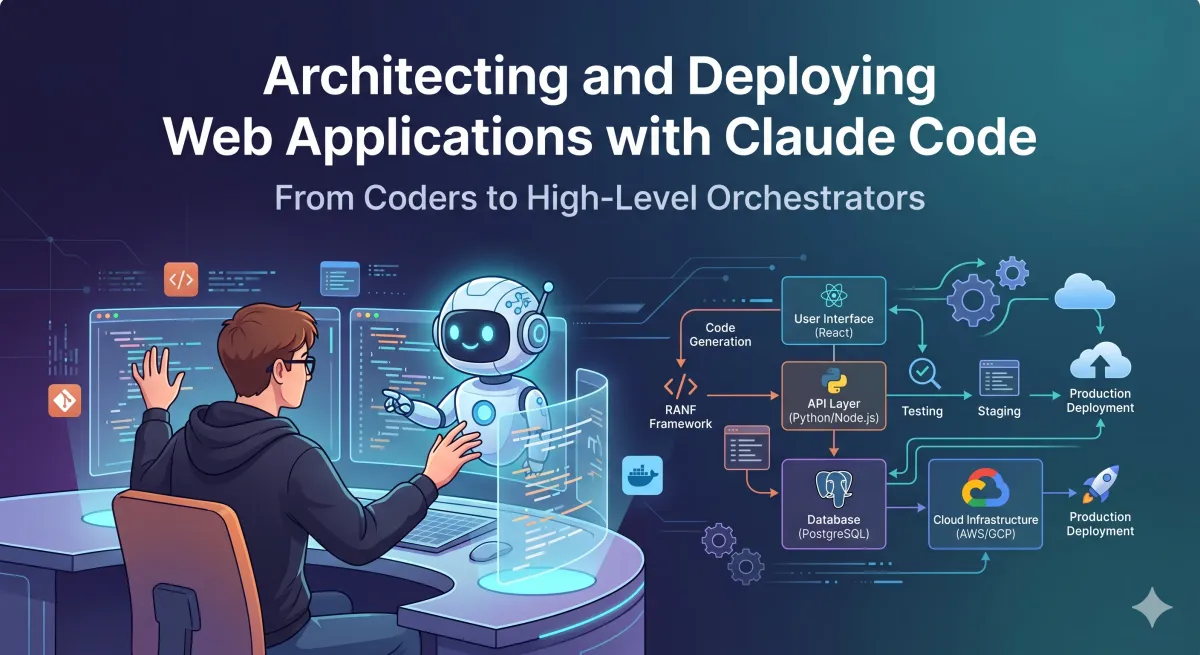
The software development industry is pivoting from a manual, instruction-heavy coding paradigm to a results-oriented, agent-driven lifecycle. This roadmap serves as a technical blueprint for the Document Architect, detailing the deployment of Claude Code and the RANF framework to engineer high-fidelity, production-ready applications. Unlike traditional development, where the human manages every line of syntax, this approach leverages autonomous agents to manage entire subsystems—from GitHub repository maintenance to full-stack component construction.
The shift is defined by moving from a static "Chatbot" to a dynamic "AI Agent." While a chatbot functions as a high-IQ encyclopedia requiring step-by-step guidance, an AI agent utilizes a reasoning engine to make autonomous decisions, use local tools, and execute multi-step workflows to achieve a stated goal.
The Agentic Paradigm Shift
| Feature | Chatbot (Encyclopedia Model) | AI Agent (Intern Model) |
|---|---|---|
| Input/Output | Question → Answer | Goal → Result |
| Operation | Requires manual guidance | Operates with tool autonomy |
| Engine | Static knowledge retrieval | Reasoning engine for decision-making |
| Capabilities | Text generation only | File editing, API calls, Terminal execution |
| Environment | Isolated chat window | Integrated workspace (IDE/Terminal) |
Adopting this "intern-model" offers a massive competitive advantage. By delegating complex tasks like debugging and repository management to an agent, engineers transition into the role of high-level orchestrators, focusing on architecture and strategic governance.
2. Foundation Setup: Environment, Tooling, and Protocol Integration
A unified development environment is the essential workspace for an autonomous agent. To function effectively, the agent requires deep integration with the IDE to "see" documents and manipulate files in real-time.
Technical Installation and IDE Configuration
Claude Code is a command-line interface (CLI) tool that requires a Claude Pro or Max subscription.
- Installation: Execute deployment via Homebrew or curl:
brew install anthropic/claude-codeor the equivalent curl script. - Authentication: Run
claude /loginto synchronize the subscription and establish the session. - IDE Selection:
- Microsoft VSC: Straightforward and extensible. Requires the "Claude Code for VSC" extension.
- Google Antigravity: An AI-focused fork of VSC. It is architecturally superior for agentic workflows as it allows Claude to "see" documents directly in the chat window for immediate manipulation.
The Model Context Protocol (MCP) Layer
The Model Context Protocol (MCP) is the "USB-C for AI." Without MCP, developers face an M x N integration problem: every time a model (M) changes, every tool integration (N) must be rewritten. MCP standardizes this communication, allowing any model to connect to any data source via a universal bridge.
The MCP Client-Server Model
- MCP Client: The host application (Claude Code/Antigravity). It speaks only "MCP," removing the need to understand specific 3rd-party APIs.
- MCP Server: A standardized bridge to data.
- Google Drive MCP Server: Synthesizes project documentation and assets.
- Postgres MCP Server: Facilitates direct interaction with databases for schema design and data research.
Technical Strategy: For maximum token efficiency, recurring MCP workflows should be converted into "Skills." If a user frequently asks "how do I use gmail MCP?", the agent should eventually turn that Gmail API interaction into a local skill to save context.
3. Context Engineering: The .claude/ Governance Structure
Context Engineering—the strategic design of the entire input environment—is superior to prompt engineering. It ensures the model is "onboarded" to the project with the correct technical boundaries and domain knowledge.
The Hierarchical .claude/ Architecture
Governance is managed through three merging layers of configuration:
- Global Layer (
~/.claude/): Personal instructions applied to all projects.CLAUDE.md: Personal onboarding and general preferences (equivalent toagents.mdin other platforms like OpenClaw orgemini.mdin Google environments).settings.json: Global permissions, hooks, and environment variables.projects/: Containssession-id.jsonl(full conversation logs) andmemory/MEMORY.md.
- Local Layer (
.claude/): Project-specific logic and rules.settings.local.json: Personal overrides (gitignored).CLAUDE.local.md: Personal project notes (gitignored).rules/: Modular instructions such ascode-style.md,testing.md, andfrontend/react.md..mcp.json: Local project MCP server configurations.
- Enterprise Layer: Managed system-level instructions for organizational compliance.
Skill Creation and Progressive Disclosure
Skills are reusable, modular capabilities that teach an agent how to perform specific tasks. This follows the principle of progressive disclosure, where skills are loaded only on demand to keep the context window lean.
- Iterative Workflow: Perform a task once with the AI, then instruct it to "build a skill" from the successful run.
- Source Learning: Upload a resource (e.g., a viral messaging course) and instruct: "Based on this course, give me a viral hook skill."
Memory Consolidation via /dream
To prevent index bloat and stale info, use /dream for memory management. This prevents redundant data entries and resolves contradictions through a four-step process:
- Orient: Assess the current state.
- Gather Signal: Identify relevant data.
- Consolidate: Merge redundant entries into a single verified consensus.
- Prune & Index: Remove relative dates and obsolete info to create a concise, absolute-dated index.
4. The RANF Framework: Assemble, Normalize, Fill
The RANF framework transforms fragmented components into high-craft digital products.
Phase 1: Assemble
Source high-quality components from 21st.dev or Godly.website.
- Workflow: On 21st.dev, click "copy prompt" \rightarrow choose "Claude."
- Structure: Create a
/componentsdirectory in the project root. Paste the copied prompts into individual.txtfiles within this folder. - Prompt: "Create a website with ALL components inside the components folder."
Phase 2: Normalize
Components from different sources often have conflicting styles.
- Normalization Prompt: "Identify any inconsistencies in fonts, spacing, colors, and component sizes. Normalize everything so it looks and feels like one coherent, polished page."
Phase 3: Fill
Replace placeholders with niche-specific research.
- Research Prompt: "Review the existing structure. Do extensive research on [Humanoid Robots] to gather naming, branding, specs, and pricing required to fill these sections."
- Execution: Instruct the agent to review the site with realistic, polished content consistent with the brand identity. Guardrail: No walls of text; keep content concise and impactful.
5. High-Fidelity UI Verification via Screenshot-Based Feedback
Visual verification is mandatory to achieve "Apple-grade" design. The agent must see the rendered output to fix mismatches that code analysis alone cannot detect.
Technical Workflow
- Serve: Always serve on
localhost. Start the server withnode serve.mjs(root athttp://localhost:3000). - Capture: Use Puppeteer via
screenshot.mjs. Terminal command:node screenshot.mjs http://localhost:3000. - Analyze: Use the agent's Read tool to analyze the PNG from the
temporary screenshots/folder. - Iterate: Follow the Hard Rule: Perform at least 2 comparison rounds. Do not stop after one pass.
Anti-Generic Guardrails
Enforce these rules in CLAUDE.md to avoid the "default Tailwind" look:
- Gradients: Use multiple radial layers with a grain/texture via an SVG noise filter for depth.
- Interactive States: Every clickable element must have hover, focus-visible, and active states.
- Images: Apply a
bg-gradient-to-t from-black/60overlay and a color treatment layer usingmix-blend-multiply. - Typography: headings must use tight tracking (
0.03em); body text requires generous line-height (1.7).
6. Specialist Agent Teams and Multi-Step Workflows
Scaling for non-trivial code changes requires a specialized team hierarchy, enabled in settings.json.
Specialized Roles and Permissions
- Product Owner (Orchestrator): Manages the to-do list and final acceptance.
- Architect (Planner): Defines file structure and data flow.
- Developer (Coder): Executes the plan via
edit_filetools. - QA (Critic): A perfectionist looking for bugs and security vulnerabilities.
The Workflow Sequence: (1) Write/Edit → (2) Code Review (spawn 'code-reviewer') → (3) QA (spawn 'qa') → (4) Ship.
Plan Mode: For maximum efficiency, use the plan mode. This is a read-only exploration mode that allows the agent to research all factors and develop a plan (e.g., "PO + Architect plan") before writing code.
7. Deployment Pipeline: From Localhost to Vercel
The lifecycle of code moves from the local development environment to a public production URL through a standardized automated pipeline.
The Production Pipeline
- Local Machine: Claude Code writes and tests on
http://localhost:5100. - Version Control:
git pushto a GitHub repository. - Cloud Deployment: Vercel auto-deploys the repository.
- Live URL: Final production at
yoursite.domain.
Scaling and Cheapening
To reduce costs by up to 99%, developers can "swap the engine" by using open-source models while keeping the Claude Code "car" (interface and features).
- Ollama: Run local models (e.g., Qwen 3.5). Use the
Modelfileto increase context:ollama create qwen3.5-9-64k -f Modelfile. - OpenRouter: Redirect the model engine in
settings.jsonby updating theanthropic_base_urltohttps://openrouter.ai/apiand providing an API key.