
Choose the right AI model for your task - A framework for matching model intelligence to your work
Start with a shortlist, compare the Pareto frontier, then test the candidates on your own work. Choose the least expensive configuration that meets your requirements.

Who should read it?
Independent professionals, product teams, and technical readers choosing models for everyday work
Cross-linked article
What problem does this article solve?
This article solves 3 key problems:
- Model selection paralysis
- Eliminates leaderboard bias and helps you choose based on your actual work
- Cost opacity
- Gives a transparent cost-per-result framework instead of relying on vague benchmark numbers
- Testing uncertainty
- Provides a concrete 4-step protocol with representative examples and held-out cases
How to use this framework
- Shortlist models that can handle your data, tools, and budget. Exclude unapproved providers.
- Compare the Pareto frontier to find configurations that are cheapest for their intelligence.
- Test the promising candidates on your own tasks, then compare the cost of an accepted result.
- Choose the lowest-cost candidate that passes your quality checks.
The table compares 12 configurations from 4 model families. A dot marks a configuration on the Pareto line:
- Within this shortlist, no other configuration has an equal or higher score at the same or lower estimated benchmark cost.
Read these numbers as a historical illustration, not a price quote. They come from a November 5, 2026 archived estimate that repriced Artificial Analysis benchmark usage at assumed OpenRouter floor rates. The estimate assumes high cache reuse. Your workload, provider, and actual bill can differ.
DeepSeek max (index 32.6, $0.032 per task) is
- Cheaper than Sol low (index 34.8, $0.081)
- Beats Terra low (index 29.4, $0.036) on cost per index point
Figure 1 plots the 11 priced configurations from the table. The ringed points and the solid line are the Pareto frontier:
- The cheapest option at each intelligence level
Points below and to the left of the line are beaten on both measures.
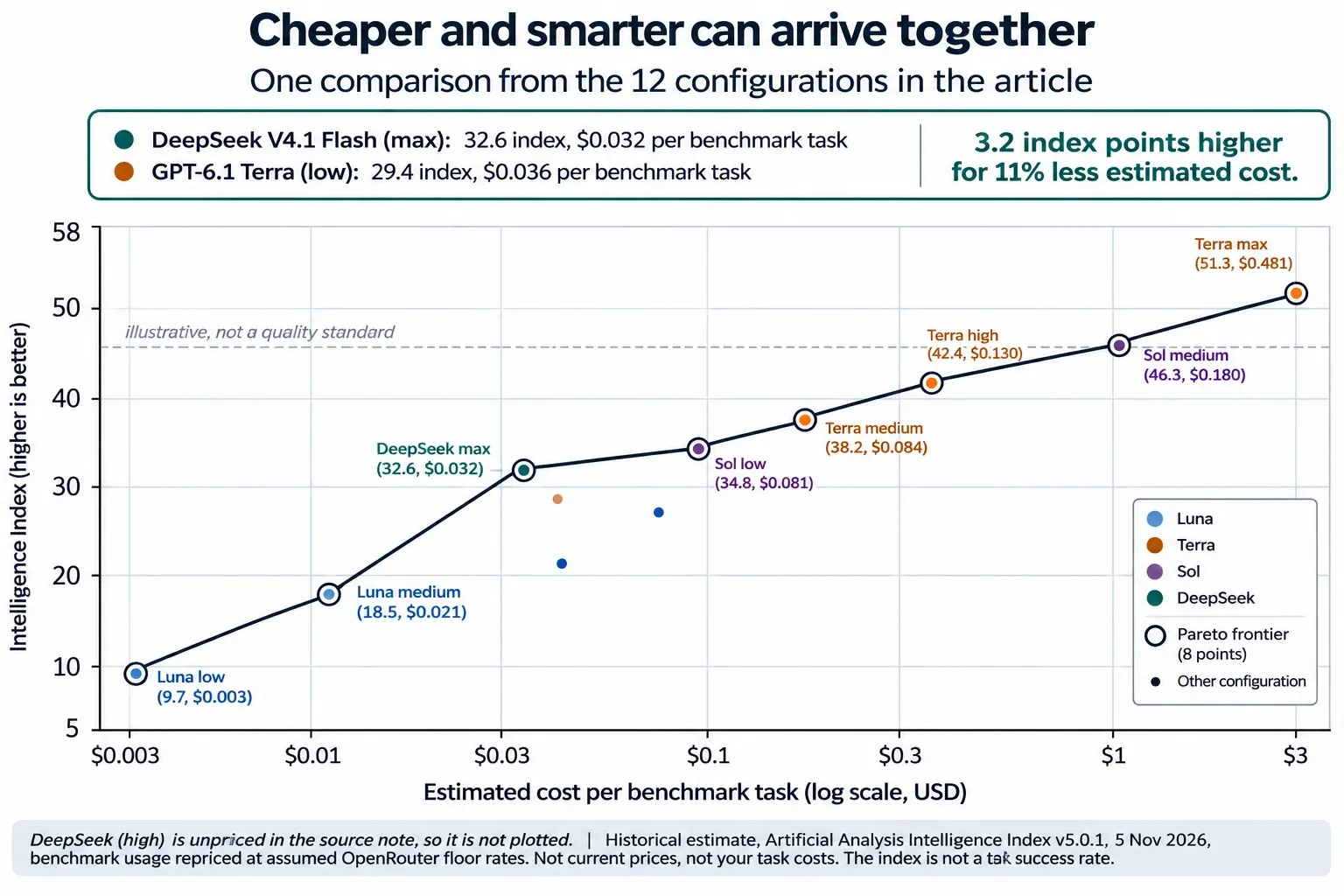
Figure 1. Estimated cost per benchmark task against Intelligence Index for the shortlist. Ringed points sit on the Pareto frontier. Historical estimate, not a price quote.
The Pareto line runs through:
- Luna (low)
- Luna (medium)
- DeepSeek max
- Sol (low)
- Terra (medium)
- Terra (high)
- Sol (medium)
- Terra (max)
Start with models you are considering
| Model | Effort | Pareto | Intelligence Index | Input ($/1M tokens) |
Output ($/1M tokens) |
Estimated benchmarka ($/task) |
|---|---|---|---|---|---|---|
| GPT-6 Luna | low | ● | 9.7 | $0.05 | $0.25 | $0.003 |
| GPT-6 Luna | medium | ● | 18.5 | $0.05 | $0.25 | $0.021 |
| GPT-6 Luna | high | 21.4 | $0.05 | $0.25 | $0.036 | |
| GPT-6 Luna | max | 27.9 | $0.05 | $0.25 | $0.076 | |
| GPT-6.1 Terra | low | 29.4 | $0.50 | $2.50 | $0.036 | |
| GPT-6.1 Terra | medium | ● | 38.2 | $0.50 | $2.50 | $0.084 |
| GPT-6.1 Terra | high | ● | 42.4 | $0.50 | $2.50 | $0.130 |
| GPT-6.1 Terra | max | ● | 51.3 | $0.50 | $2.50 | $0.481 |
| GPT-6.1 Sol | low | ● | 34.8 | $1.00 | $5.00 | $0.081 |
| GPT-6.1 Sol | medium | ● | 46.3 | $1.00 | $5.00 | $0.180 |
| DeepSeek V4.1 Flash 1017 | max | ● | 32.6 | $0.073 | $0.108 | $0.032 |
The benchmark cost column is an estimate for benchmark tasks, not the cost of a completed task in your workflow.
The DeepSeek figure is measured price ratio on 150 billed calls of real traffic: 4.8 times cheaper per call, 2.6 times cheaper per session. The session basis is the one in the table. DeepSeek needs more calls to finish the same work. On the per-call basis the same row would read $0.017, which is the optimistic end of the range. The result is an estimate. It rests on 16 attributed sessions. The token price is the cheapest live endpoint for this model.
Swap models for your own setup
To apply this framework with your own models, replace any row in the table with a configuration you actually use:
| Step | What to change |
|---|---|
| Model | Replace the model name with yours (e.g. swap "GPT-6 Luna" for your preferred model). |
| Effort | Use your own effort level (low / medium / high / max) or "none" if your model doesn't have effort tiers. |
| Provider | Keep the provider you buy from: cost differences between endpoints can be larger than differences between models (DeepSeek spans 16.6x across endpoints). |
| Intelligence Index | If you don't have a composite index, use your own quality score from held-out testing. |
| Estimated $/task | Compute it yourself: (input tokens × input price + output tokens × output price) per task, using your real prompt mix. |
The Pareto math stays identical with your substitutions:
- Compute each configuration's estimated cost per task
- Mark which ones are on the frontier (cheaper or smarter than every other config at that cost point)
- Then test the most promising ones on your own work
Read the Pareto line
Cheaper and smarter can arrive together
- DeepSeek (max) costs an estimated $0.032 per benchmark task for an index of 32.6
- Terra (low) costs $0.036 for 29.4, so it is beaten on both measures and leaves the line
- Luna (high) goes the same way at the same price, scoring 21.4
The line runs through Luna (low), Luna (medium), DeepSeek (max), Sol (low), Terra (medium), Terra (high), Sol (medium), and Terra (max).
Treat neighbours that cost within a few percent of each other as unstable, and test both rather than trusting the table.
To compare the price of moving along the line, divide the increase in estimated cost by the increase in Intelligence Index.
For example:
- Sol (low) to Terra (medium) adds 3.4 index points for an estimated $0.003 more per benchmark task
- DeepSeek (max) to Sol (low) is the expensive one: 2.2 points for $0.049, the worst value on the line before the final step
How to read the cost per index point
- Luna (low) → Luna (medium): $0.0020 per point
- Luna (medium) → DeepSeek max: $0.0008 per point
- DeepSeek max → Sol (low): $0.0223 per point
- Sol (low) → Terra (medium): $0.0009 per point
- Terra (medium) → Terra (high): $0.0110 per point
- Terra (high) → Sol (medium): $0.0128 per point
- Sol (medium) → Terra (max): $0.0602 per point
Divide the extra estimated cost by the extra index points, step by step. The last step costs about 30 times more per added point than the 1st step, and about 77 times more than the cheapest step on the line.
Figure 2 draws the same 7 numbers as bars, so the expensive step is visible at a glance.
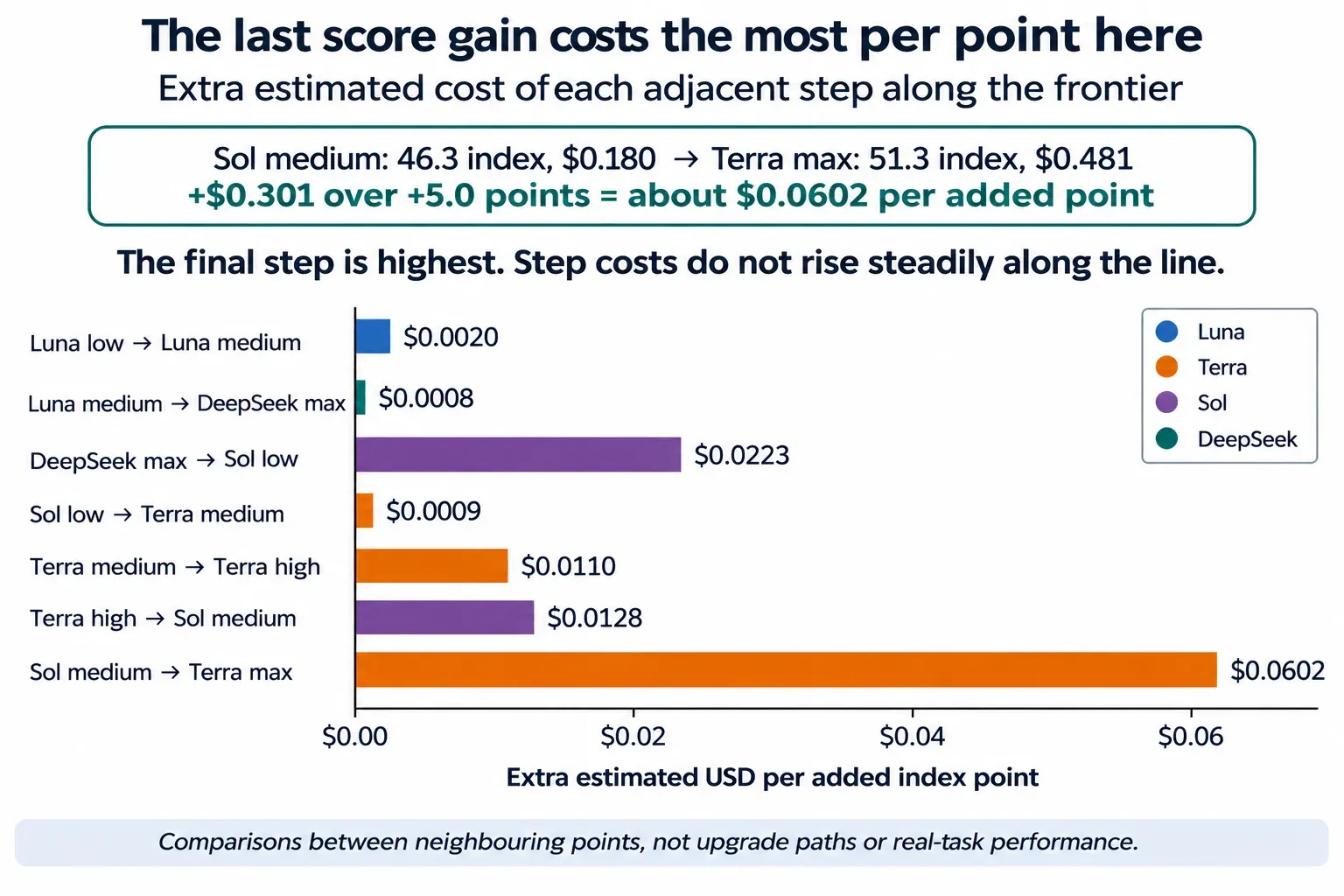
Figure 2. Extra estimated cost per added index point for each step along the frontier. The rightmost bar is the final step, Sol medium to Terra max.
Test the shortlist on your work
First, rule out configurations that cannot meet your constraints: input type and length, required tools, privacy and provider rules, response time, and budget. An attractive score cannot make an unapproved provider acceptable.
Then compare the remaining candidates
- Collect representative examples
- Use sanitized or approved inputs, including ordinary cases and mistakes that would be costly to miss.
- Define success before testing
- For a summary, check factual accuracy, coverage, and clarity. For code, check tests and whether existing behavior is preserved. Decide which failures need human review.
- Run the same tasks
- Keep instructions, tools, and acceptance rules comparable. Record any configuration-specific changes. Hide model names during human review when practical.
- Keep a final check separate
- One starting point is 20 development cases and 10 held-out cases. This is a small pilot, not proof of a reliability rate. If you tune against the held-out cases, collect fresh ones for the next check.
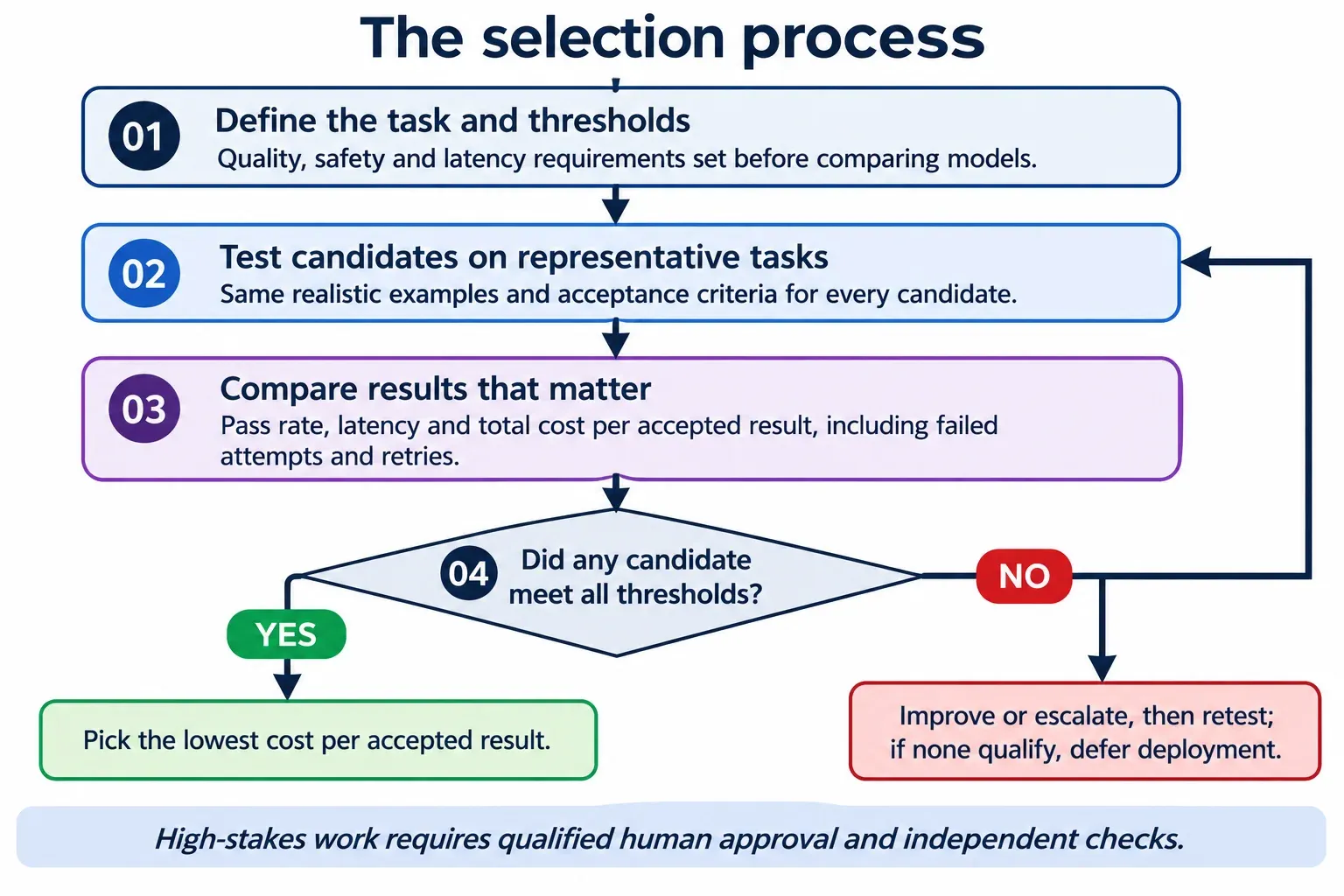
Compare the cost of an accepted result
For each candidate, add the cost of all calls, retries, tools, and review, including failed attempts. Divide by the number of accepted results. If you cannot put a price on review time, report the minutes separately instead.
For example:
- Configuration A costs $16.60 in total and produces 18 accepted results: about $0.92 each.
- Configuration B costs $12.00 and produces 19: about $0.63 each.
B used more expensive model calls, but needed less review. This sample does not guarantee that B will remain cheaper, and the consequences of failed tasks should be reported separately.
Choose the lowest-cost candidate that passes your checks. Keep human approval for high-stakes work, and retest when the model, provider, prompt, tools, or workload changes.
References
[1] Artificial Analysis, Intelligence Benchmarking Methodology.
[2] OpenAI, Evaluation best practices.
[3] OpenRouter, Floor variant.
[4] OpenRouter, GPT-6.1 Terra and GPT-6.1 Sol model pages.
[5] DeepSeek, model pricing documentation. Current model pages do not establish the historical estimates above.